Achieving Full WordPress SEO Automation w/n8n

1월 26, 2026
[Dev Log] Achieving Full WordPress SEO Automation with n8n
- Co-worker Model: Gemini Pro
- Tech Stack: n8n, WordPress, Google Sheets, OpenAI API, Rank Math
- Goal: Build an end-to-end automated pipeline—from content generation to SEO optimization and instant publishing.
- Date: January 6, 2026
- Progress: 4th Iteration
- Focus: Troubleshooting 5 Key Automation Issues
1. Issue: Workflow Interruption (System Standstill)
- Symptoms: A perfectly functioning workflow suddenly stopped executing without any trigger.
- Initial Hypothesis: I suspected an IP block or location-based restriction because I recently moved from Korea to Canada.
- Root Cause Analysis: It wasn’t a location issue. The OAuth credentials (tokens) between n8n and Google/WordPress had expired, causing the connection to drop.
- Solution: Reconnected accounts and refreshed access tokens.
2. Issue: Infinite Duplicate Publishing
- Scenario: The workflow kept publishing the same article based on the first keyword in the Google Sheet.
- Logic Analysis:
- n8n: “Fetch the first row with Status = READY.” → Fetches Row 1.
- WordPress: Publishes the post.
- Google Sheets: Failed to update the status to DONE.
- Next Execution: Since Row 1 was still READY, n8n fetched it again. (Infinite Loop)
- Solution: Refined the ‘Update Row’ node logic. I set a limit to process exactly one row at a time and forced the system to update the status to DONE immediately after publishing.
3. Issue: Automating ‘Draft’ to ‘Published’ Status
- Symptoms: Automation was working, but posts were piling up as ‘Drafts’ in WordPress, requiring manual publishing.
- Solution: Configured the WordPress node settings to change Post Status from ‘Draft’ to ‘Publish’ for a truly hands-free experience.
4. Issue: Rank Math SEO API Integration (SEO Automation)
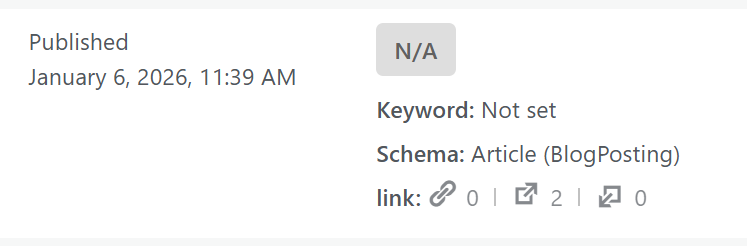
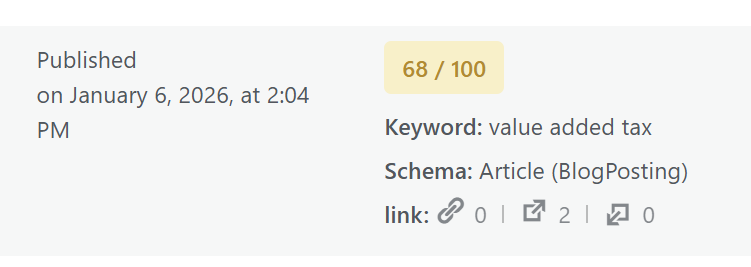
- Objective: Automatically set “Focus Keywords” via the Rank Math API to optimize SEO scores.
- Trials & Errors:
- Attempt 1 (404 Not Found): I used a relative path (
/wp-json/...). Fixed by using the absolute URL (https://mydomain.com/wp-json/...). - Attempt 2 (400 Bad Request): Parameter mismatch. Found that Rank Math requires an
objectIDrather than just a standardid. Re-structured the payload based on documentation. - Attempt 3 (JSON Parsing Error): Special characters and line breaks in AI-generated text broke the JSON syntax.
- Attempt 1 (404 Not Found): I used a relative path (
- Final Success Code (JSON Payload):
JSON{ "objectID": {{ $('Create a post').item.json.id }}, "objectType": "post", "meta": { "rank_math_focus_keyword": "{{ $('If').item.json.Keyword }}" } }
- Result: Succeeded in syncing Focus Keywords automatically upon publication.
5. Issue: Unexpected Workflow Crashes & Duplicate Handling
- Conflict: AI (Gemini) kept suggesting I add more nodes, while I knew the existing structure was correct. It turned out the AI had lost context of my previous workflow history.
- Root Cause: The [HTTP Request (SEO)] node was throwing errors and terminating the entire workflow before it could reach the final ‘Update Row’ node.
- Solution: Changed the node’s error handling setting to “On Error: Continue.”
- Result: Even if an SEO update fails, the system ignores the error and proceeds to mark the row as DONE, preventing duplicate posts.
Final Summary
- System Stability: Resolved duplicate publishing issues through robust error handling.
- SEO Excellence: Achieved “Green Light” SEO scores by automatically setting Focus Keywords via API.
- Efficiency: Now, I simply fill a Google Sheet with keywords, and the system automatically builds a library of SEO-optimized posts while I sleep.
Next Steps
- Smart Internal Linking: Add logic to link images to relevant internal URLs.
- Hook Engineering: Refine AI prompts to generate high-CTR (Click-Through Rate) headlines.